Monday, June 30, 2008

Regional Settings Are Simple

Regional setting look like something they got right in SharePoint. At least sort of.

This very clear and simple article sums it up nicely: http://office.microsoft.com/en-us/sharepointserver/HA101774731033.aspx

I will attempt to make things even more concise, so as to distill this down to what I needed to know as we prepare to roll out farms in Asia and Europe.

  1. Don't set a time zone in the Central Admin Web Application General Settings as this will override the settings on the site collection or sub site (unless that is what you really want to do).
  2. Users will need "Edit personal user information" permissions if you want them to be able to set "My Regional Settings" (off the Welcome menu).

When a sub site is created it inherits the locale settings from the parent. These can be changed at the site level.

If a user has permission, they can override the setting for the sub site. When they uncheck Always follow web settings, they get locale, time zone, calendar and alternative calendar(??), work week and time format settings.

That's pretty simple. I will need to verify that this works consistently.

Thursday, June 26, 2008

Mike McCartney Gets It


Last night I went to an event at the Rock and Roll Hall of Fame and Museum where Mike McCartney, who not surprisingly reminds me a great deal of his older brother Paul McCartney, gave a talk about his photography (and life in general). As Liverpudlians always seem to be, Mike is very charming and talkative, and he has had many interesting experiences.

In talking about his work, Mike expressed a love for taking pictures. To him, having a camera around so he can capture images is an important part of his life. I think it it his most profound way of expressing himself. I was very pleased to see him expressing the opinion that, although it is important to know how to use the medium (craft), the quality of the camera (technology) is of much less importance. I very briefly talked with him about this, and he and I agreed that WHAT you are doing with the camera (where you point it) is what it is all about.

Unfortunately, people I know who fancy themselves amateur and "professional" (I don't want to insult anyone with a "wannabe" prefix) photographers don't seem to get it. Maybe you can be a good photographer, but you can never be any kind of artist unless you understand this. Seeing an image taken with a decent cell phone camera, for instance, would INSPIRE an artist to dump the expensive Canon (not forever, just for a bit) and take a series of crude but cool photos. I have been inspired by my cell phone camera many times (although that doesn't make me a great artist either). The musical equivalent would be a toy piano or a cheesy electronic organ. Or a Danelectro guitar.

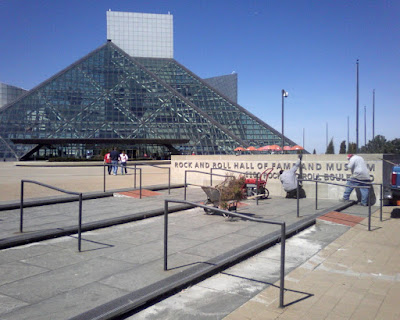
The extremely low-light (cell phone camera) photo above was taken at the Rock Hall today. Mike was signing autographs and generally just hanging out and being the lovely man that he is.

Wednesday, June 25, 2008

CancĂșn Vacation

Last week I traveled to CancĂșn with my wife Gayle, daughter Holly and son Matt. We all certainly needed a vacation, and we were glad to spend some time together. We went to an all-inclusive resort - you know the drill, all the food and drink is included. This was great for us as we felt uninhibited and ate a drank a lot. The food was great. The drink was plentiful (I got the most, but both kids had a quite a bit of alcohol on this trip).

It was beautiful and hot, and we would go again if the opportunity afforded itself. Check out our photos (this is just a sampling):


Friday, May 30, 2008

"Summer" 2008 - Has it Started

It's been pretty chilly here - not quite summer - but we are trying to force our way into it. We shivered through an Indians game (if only we had been in the sun more the shorts would have been fine), went swimming (once), and now Cedar Point (on a very pleasant day).

How about those puffy cheeks from the "Rocket Sled" that is the front seat of Top Thrill Dragster.


Boilermaker

Sunday, May 11, 2008

Not Quite Gilligan's Island

I am headed to Cancun with my family very soon and we all may be in for some technology withdrawal. OK, so they have electricity, satellite TV, and some pretty lively entertainment, from what I've heard. Buses and boats and whatnot are plentiful too. Clearly our all inclusive hotel will qualify as an overindulgence of eat and drink. BUT ... no phone, no net, not a singly luxury ... as primitive as can be.

Although we should be able to get cell coverage, it will be absurdly expensive (for us impoverished gringos). We are all quite used to calling anyone, anywhere (in the US), any time, especially amongst ourselves. That's out.

I thought about using our FRS and GMRS radios that haven't seen the light of day for several years, but they aren't legal in Mexico. They have FRS (no GMRS) but our radios are not certified for Mexico. I might take a couple anyway, but my family always thought they were extremely hokey.

I have found that no hotels in the Cancun zona have free Internet of any kind and the only free Internet I have found was one spot at the airport. That would leave us paying $20/day at the hotel (I think) or something like $7/hour at a cafe. I'll probably have to spring for that.

Part of the purpose of the vacation (for me at least) is to get away from the keyboard, so maybe that's not so bad, but I hope the withdrawal symptoms can be mitigated with tequila.

It would be nice if the professor were there to figure out how to fix our cell phones and connect to the Internet with coconuts and bamboo.

Tuesday, April 22, 2008

Direct TV Dumping Satellites for Blimps?

I look out my office window and see a Direct TV blimp fighting its way through the wind. I wonder: Is Direct TV dumping satellites for blimps?


Monday, April 21, 2008

Rock and Roll Boulevard

Greetings from the corner of Rock and Roll Boulevard and Lakeside Avenue in beautiful downtown Cleveland. While I was in Vail, Colorado last December, an announcement was made that one of the main streets here (the one that terminates at Lake Erie with the Rock and Roll Hall of Fame and Museum, East 9th Street) was being renamed "Rock and Roll Boulevard."

This was pretty cool for me, as a charter member (and frequent visitor) of the Rock Hall, a native Clevelander, and someone whose office overlooks the Rock Hall. I'm not sure if they made a big deal of the announcement - I was out of town, but they have very quietly put up street signs underneath the East Ninth signs that say Rock and Roll Boulevard. Last week they also changed the signage on the building itself (see photo). Woo hoo!

Wednesday, April 02, 2008

What Constitutes Technical Competance for an End User?

Unfortunately, IT people berate non-technical people all the time. Much of the time we don't understand why so many of them "don't get it" and why they are SO far behind. Although these attitudes are to be expected, they do not breed a good customer service environment. So try to put on your rose colored glasses and think that the glass is half full. There is (probably) a reason why this person is in the position they are - someone thought they were valuable (and people are WAY more valuable than machines - maybe not systems, but most machines - but that is a topic for another day).

With that respectful disclaimer in place, I have some ideas about good users vs. bad users. It's interesting, you have bitching and moaning from both of these. Good users bitch and moan constructively, and bad users, well, for many reasons. The constructive bitching and moaning is one way to tell the good from the bad.

What is the bad user bitching and moaning about? Sometimes it is everything. Nothing works. Everything sucks. Nothing is designed right. Everything is too slow. I have tried many times to turn such users away from the dark side and maybe I have even fixed a few of them - permanently - transforming them to competent users. Although this is a worthy goal, don't drive yourself crazy trying to save everyone from their (most likely self-inflicted) technological hell.

Just listen. Is there something they are doing wrong that you can correct? Is there something you can build to better accommodate their work?

Another way to differentiate the competent from the incompetent is by how well they can accomplish what they do with technology. Does it enable them, or get in their way? Most of the time we are not well qualified to make such judgments, but we are entitled to our opinions. Some people take what is given them and soar. Others get mired in problems they cannot overcome. I think we know which ones we'd rather have for customers, sponsors, etc.

Monday, March 24, 2008

Spell Check Fix Clarification

The MOSS 2007/WSS 3.0 spell check bug (that supposedly IS fixed in SP1, but I'd like to know how they fixed it) has had work arounds documented several times, but I'm not sure any of these were complete. Neither will this one be, but I have two observations I would like to share.
  • You do not need to have any special permissions on the root of your site collection (just read).
  • Spell check can also be broken with inadequate permissions in the %windir%\temp on the web front ends.
The standard "fix" is to have a document library called "Spelling" off the root of each site collection, and in that library you need a junk document named "Custom Dictionary.txt." It doesn't matter what is in this document. The users need to have at least some (read?) access to the root, but to this Spelling document library they need these permissions (and nothing more):
  1. View Items
  2. Browse Directories
  3. View Pages
  4. Use Remote Interfaces
  5. Open
With this access, depending on what they have in the root, they may not be able to see the list, and they defeinitely cannot even open it in Sharepoint. They are unaware it exists.

The other problem we have seen is that on the %windir%\temp folder (usually C:\Windows\Temp) on each of the web front ends, the Network Service needs the following permissions:
  1. Traverse Folder/Execute File
  2. List Folder/Read Data
  3. Read Attributes
  4. Delete
  5. Read Permissions
Being cruddy work arounds, I'm not sure how well these are documented anywhere. These are the steps we have had to take to keep working. It is a shame that the SharePoint community has had to endure bugs like this. Unfortunately I am pretty sure most of us will not be taking SP1, so we won't see how they fixed this problem.

Thursday, March 20, 2008

Backup/Restore "Duplicates" and Broken "Content and Structure" (Settings.aspx)

This took a couple hours of staring at things and looking at every side of everything. I had used STSADM to back up a site and restore it to another site collection. This went pretty well, except for two problems:
  1. Two of the lists showed up twice in the "All Site Content" (viewlsts.aspx) and
  2. Content and Structure (settings.aspx) would error
#1 Symptoms
I tried deleting one of the lists. Oops. It deleted both (there really only was one). Hooray for the Recycle Bin!
The allitems.aspx for each list showed two web parts for the list (this is significant).

#2 Symptoms
You could navigate to any of the lists and stuff if you opened Content and Structure from another subsite, but you could not get to the root of this site.

Fix:
Delete the extra (duplicate) webparts from the allitems.aspx and all three problems went away.

Why? Ha! You tell me! But I am happier, and the users are happier. I'm just not very warm and fuzzy (welcome to my life with SharePoint).

Monday, March 10, 2008

How to Move the Central Admin Site, Even if You Already Screwed it Up

Revised! And also see http://bobklass.blogspot.com/2008/07/moving-central-admin-again.html
Moving the Central Admin site the right way is easy:

Run config wiz on old, removing
Run config wiz on new adding


But what if you did something to screw that up, like:

Start Central Admin on new server (through Central Admin)
Stop Central Admin on old server (through Central Admin)
Run Configuration Wizard on new server

which would leave you with NO Central Admin server?

You will have to try a little harder if you really want to screw things up. To fix it:

Run Config Wizard on new and REMOVE central admin
Run Config Wizard on the old and remove central admin
Run Config Wizard on new and ADD central admin

Similarly, you probably could redo the old Central Admin if it were screwed up and then do it the right way once everything was back the way it should have been. The right way:

Run config wiz on old, removing
Run config wiz on new adding

That's all fine, but sometimes SharePoint just won't do things the right way. My production server didn't present the option to remove the Central Admin site (why?) until I removed it from the farm and added it back (and the first time I ran the Config Wizard it took over an hour!).

But then it looked like the "right way" wasn't working. Upon close inspection, everything seemed to be where it should be. The problem was that the alternative access mapping for Central Admin needed to be changed (it still showed the old server). So just put in an explicit address and include ../default.aspx and navigate to the maintenance page, or just use ../_admin/AlternateUrlCollections.aspx and then change it to your new Central Admin server.

Friday, February 29, 2008

Sharepoint Virtualization - Numero Drei

Hopefully I won't seem like a person who waffles. Or someone who jumps to conclusions. I have tried to be objective and I tried to make the testing meaningful. I will share here an unsanitized version of what I published to our team:

Our tests were performed with a two server MOSS 2007 farm with the same databases running on a fairly robust (physical) SQL cluster. One server was an indexer only, and the other served the SSP, web front end, etc. No special Sharepoint caching was turned on for any sites. The physical servers tested were HP servers with 2GB RAM and two (older) 3.4 ghz dual core processors in each. The virtual servers ran with 2GB RAM and variously 2 or 4 processors on an ESX system that I believe had two dual quad core machines and LOTS of RAM.

Three categories of test were performed:

  • Indexing performance
  • Web page traffic
  • Document library traffic/search queries

Results were monitored from various sources - HP OpenView, Loadrunner, WAPT, Windows native, and subjective.

1. Indexing
Indexing virtual to virtual with 2 processor machines seemingly outperformed physical in all categories except CPU usage, which was significantly higher on the virtuals (though acceptable). The time to complete the index was almost the same for physical and virtual farms.

We did not have any HPOV data on the indexer.

2. Web Page Traffic
An older script was run with Loadrunner, simulating 250 users for 15 minutes. The script was web page views only. In general, the virtuals outperformed the physicals in these tests. Neither was overloaded.

3. Document Library - File and Search
A short script was created to download two large files (30 MB) repetitively and do some search queries. This is a realistic document library scenario of Intranet content being downloaded simultaneously by multiple users. The script was run with WAPT via several different PC's, with anywhere from 20 to 200 sessions simulated. The tests were run from the same part of the building and presumably through a small number of ports on the same network switch.

None of the systems performed this test well. Heavy file activity can be the bane of SharePoint's existence, even though we often use it as a document management system that is easy to use and access from any office. Large files are common, and access to such files usually cannot be managed (if it were managed, we could easily cache such files and more easily serve up large files to many users).

The physical servers were slow but remained responsive during this test. CPU utilization was usually below 50%, with some higher spikes. Four processor virtualized servers remained responsive during this test, but were very slow (slower than the physicals) and CPU utilization was between 30 and 75%, with some higher spikes. Two processor virtualized was almost non-responsive. CPU utilization rose to 100% and stayed there as long as the test was permitted to run. This happened for as few as twenty connections.

Conclusions
I don't want to draw too many conclusions until we have had further discussion of the testing. There may have been other limitations to tests 1 and 3 from the SQL server. Microsoft spends more time discussing SQL than it does SharePoint servers in the latest tuning info http://go.microsoft.com/fwlink/?LinkID=105621&clcid=0x409. I previously distributed this Microsoft tuning document (published in late December).

Microsoft recommends using 4 or 5 web front ends (without much qualification). Serving up files over 15 MB or having content databases over 50 GB is taxing on SharePoint and may degrade performance significantly. This latest tuning information from Microsoft is very conservative.

Our tests indicate that multiple processors are a key to maintaining reasonable performance from web front ends. Indexing seems to work fine from a virtual server.


So am I objective or what? My tests did little to confirm any of my original line of thinking.

Saturday, February 23, 2008

Virtualizing SharePoint Part Deux

Be sure to also read the next part - Numero Drei

We are still not finished with our virtualization tests, but I had to document this early stage of enlightenment (especially since the part one post seems to have been pretty far off the mark). Since virtualization very likely will be a part of my SharePoint experience from now on, I imagine there will be a part 3, 4, etc.

The state of the art of virtualization is a lot better than I thought. One of our IT groups has been building out the infrastructure for VM such that the virtuals will have a much better future than physical machines. Using multiple dual quad core servers with scads of memory, VMWare ESX is pretty amazing stuff.

The purpose of this study is to determine our server needs for a build-out of SharePoint to include new farms in Europe and Asia with up to a terabyte of data in each, and increasing North American capacity to up to two terabytes. There are around 5000 users in 30+ locations (heavily weighted to North America). The current farm is smaller (4 machines in our North America data center and less than 200GB of content). It is currently running on brand new IBM boxes (our SQL cluster is a little bit older). New 64 bit multiple quad core SQL machines will be used (VERY physical - brutes) and all the disk is on SANs.

The way it looks from the early virtualization testing, my SharePoint future is all virtual. 100% virtual. Indexer, WFEs, apps (SQL will have those big, new 64 bit physical machines). For SharePoint servers, tested performance of a VM is comparable (often better) than physical, with so many other advantages that I probably won't want ANY physical servers for the buildout, and I will probably give up the physicals that we already have.

When I started this process I was concerned that the risks of going virtual were high. I am almost convinced that it is the best way to go for high availability and performance. It does not seem to save a lot of money, but it saves some. There may be some hard to quantify costs savings (administration, power, cooling, etc.) and fortunately I will not be under much pressure to put numbers on such things (I'd make them up!).

The final conclusions will come in future posts, but this is encouraging.

Tuesday, February 19, 2008

Holiday Valley February 16, 2008

After my first skiing trip to the Rockies last December I had hoped to get to someplace closer to home a bit sooner so I could evaluate my old skis vs. the hot new stuff I rented at Vail. I also wanted to judge the lameness of the comparative experience.

Too much time has passed, though, so I couldn't judge the skis. My long, old things seemed OK. The experience is what it is. A hill a third the length of somplace like Vail (but it feels like a fifth) and terain that probably isn't a fifth in size (you can't compare them, really). The snow was perfect at Vail vs. your typical Eastern ice in New York (ice is damn fast, though, and a challenge). The lines were a bit long this weekend too, but bearable. They were sledom long at Vail.


My conclusion is that I can still have fun on day trips to Holiday Valley, and do them like I always have, with healthy trips to the Hearth (my usual restaurant) and the bar, which is so unlike my Vail experience, where I only hit the bar afterwards.


I have a story of an altercation with one of the bartenders at the Yodeler Lodge bar. I ordered an Ellicottville Brewing Co. IPA (or pale ale) for Bryce and an Ellicottville Brewing Co. Amber for myself. She brought me back what looked and tasted like Miller Genuine Draft. I told her it was the wrong beer and she said it wasn't. I said the kegs were switched when she insisted it was right. She even poured another to show me. I told her it was OBVIOUSLY the wrong beer - the color was all wrong (that EBC Amber is very pretty in the glass, it doesn't look anything like Miller). She dramatically threw the one beer in the sink, asked me what I wanted then and took the other away. She practically threw my change at me. I should have thrown the tip at her.

Tuesday, February 12, 2008

Virtualizing - Part 1

Be sure to read the other parts of this series (because it changes a lot!):
http://bobklass.blogspot.com/2008/02/virtualizing-sharepoint-part-deux.html
http://bobklass.blogspot.com/2008/02/sharepoint-virtualization-numero-drei.html


Hopefully it won't be a misnomer to call this part 1, but at this point I really don't have a lot of hard info, just my thoughts. Later, when we've tried it, I'll add more (we all hope, right?).

If you think about how the Sharepoint components work, it is easy to rule out SQL and indexers for virtualization (at least for a large farm, as we are deploying). That leaves web front ends, query servers and application servers (Excel, Infopath). We have run our farm with query server and web front end combined. The applications will be new to us very soon.

So for us, the low risk trial will be to use the (very beefy) virtuals for applications. This especially makes sense since these are processor intensive. With WFE's, there is too much risk of underperformance. What if the cache reads are too slow? We can't have it not work well.

So I am advocating that we proceed this way.

I've been lax with my posts as I try to rest my right arm - too many mouse clicks. Very painful. I'll be back!

Check out part deux.

Thursday, January 17, 2008

Spurious SMTP Errors in Logs

On a MOSS farm where you have SMTP running on one server, the rest of the servers want to run SMTP too, but they will complain over and over in the logs that they cannnot find the appropriate directory structure.

I suppose you could install and not configure SMTP on these servers, but it is eaier to just create a dummy of the structure they want.

Under the C:\INETPUB folder create a ..\MAILROOT folder and under that create a ..\DROP folder.

This will stop a whole bunch of bogus messages.

Wednesday, January 16, 2008

How to Change a MOSS Server to a Different Farm and Configuration Database

OK, big disclaimer on this one. I didn't RTFM. But this is what I did to reconfigure our large farms (6 web/query servers plus two indexers).

If you just went to a server and ran the Configuration Wizard, you would find that you cannot switch configuration databases. If you went into Central Admin (even if it is running on another server) there is a Remove Server link. If you click it, it tells you not to do it that way. Listen to what the box is saying - do not do that. Do what I say below!

The first thing to do is run Add/Remove Programs, select Microsoft Office Sharepoint Server 2007, Change, Repair. At the end of the repair it needs a reboot.

Then you rerun the Configuration Wizard and it may know you were trying to "repair." If not (I have seen inconsistency on this), go back to Central admin and remove the server (this time answer yes). If it was still connected to a config database, exit and restart the wizard after removing the server from the farm at the ../_admin/FarmServers.aspx page. Back in the Configuration Wizard, it will now bark that it can't tell if the server is in a farm (although it seems to know that it once was). This is actually a good sign. OK that BIG message box, and then you have no choice except to disconnect from the farm. This seems to clear out any remaining settings regarding the farm. Good stuff.

Then (I think you can guess this), you rerun the Configuration Wizard. Now it is like the first time you ran it on a freshly installed server. You can connect to another config database and it will run the full range of tasks (this whole process is one of the cooler administrative things I have ever seen - I wish the rest of the software was as cool!). It syncs up all your installed features and stuff. You are done, and ready to give this server a role in your farm.

Tuesday, January 15, 2008

SharePoint Book Reviews

People often ask me if there is a particular SharePoint book that I recommend. Sometimes they want basics, sometimes developer stuff. I have had a hard time finding SharePoint related books that I liked. I know I should have spent more time in the book store at Tech Ed last year, but it was a very busy conference (networking 7/24, don't ya know). Visiting the computer section of the local Barnes and Noble's, Borders, etc. can also be a very unfulfilling experience if SharePoint is what you are after. The local library (even in this lovely major metropolis) is only somewhat more fulfilling. Visiting Amazon, there seem to be a number of potentially good ones out there. I will give the scoop as I see it on the few that I know pretty well.

Since we consumers in the U.S. see these books on the shelf and recognize their publishers' branding, I will identify these by publisher. No slight to the authors intended! There is more method to this madness - I think that Wrox is on to something, and they actually have a useful, coherent layout of books.


Wrox - SharePoint 2007 and Office Development

This book turned out to be very good. They have a "tree" of related books, and this is at the top (the bottom being the "beginning" books). It explains a lot of stuff in fairly good detail. Best I've seen. It doesn't have a ton of code in it, but it has some, and it explains how things fit together.


Wrox - Beginning Sharepoint Administration

Beginning Sharepoint Administration was the best "basics" book I have seen. It had twice the detail in half the space of the "Administrator's Companion" book I have.


Apress - Workflow in the Microsoft Office 2007 System - It seems to go a long way towards explaining how things work, and it has some decent examples. Unfortunately it can't make the product function better than it is!

Microsoft - Office Sharepoint Server 2007 Administrators Companion - I can't say much nice about it. Maybe I dislike it because it was free. It never seems to have the answer to any questions.

Be sure to avoid older SharePoint books! There is little about WSS 2.0 or SPS2003 or anything earlier that would still be relevant.

Thursday, January 10, 2008

Publishing Site - Create Page - Permissions on Master Page and Page Layout Gallery

When I had this little problem yesterday, I fairly quickly (almost instinctively - that's getting scary) knew what it was. The title of this post may be all the hint anyone would need to fixing such a problem.

I set up a power user as a full control of a publishing site. Yet he could not create a page. To make a (medium) story short, the permissions on the master page / page layouts gallery were very restricted. I don't know how they got that way - either one of us admins/owners/developers screwed it up or the upgrade process did (this was once an SPS 2003 site, up since January 2006, converted to MOSS last June). Once everyone was allowed to read the gallery, the problem was fixed.

I am fairly certain this is only for a publishing site (or at least for a publishing site but not a team site). I think with team sites the (fewer) page layouts that are available are contained within the content types for that template (or something like that). I hope this helps!

Tuesday, January 08, 2008

WSS 3.0/MOSS 2007 SP1 First Impressions

Impression 1 - the Databases

I don't know what I was thinking. I guess I didn't think about it enough. What should one expect in SharePoint (WSS and MOSS) SP1? I could think of a few insidious bugs and things - simple stuff like site templates that don't hold chrome state. But I hadn't thought about how it would be delivered and implemented.

If you think about it a little, you come to the realization that a small portion of fixes might be in software that goes on the file system, but the majority of the stuff will be in the databases. That should make you go - o, oh. Danger Will Robinson. So that's what you should expect, an upgrade, similar to what you went through from WSS 2.0 / SPS 2003 to 2007, but maybe ratcheted down by several degrees of difficulty. But still a very serious undertaking.

Impression 2 - the Documentation

I AM impressed. This right here is a great read if you are at all enthusiastic about SharePoint: http://go.microsoft.com/fwlink/?LinkID=105621&clcid=0x409. This is highly recommended reading. One more time - READ IT. It has what they are calling "updated guidance." There are some new ways to categorize your installation (how to determine if you are small, medium or large). Then there are some hard core recommendations (almost warnings) about how to set up your system and thing to avoid. Much of this is important to know and doesn't necessarily have anything to do with SP1. You will find numerous other links from this document and elsewhere, but start here - trust me, it's interesting.

In some ways, it is an admission of not readiness for prime time. Let's not forget the obvious - SharePoint is sitting on top of SQL Server. As long as this is the case, it is a poor substitute for a file system (and it cannot be an industrial strength document management system). Until the future versions are built on Bitlocker, it has serious limitations. That version should be out in a couple years (my SWAG).

Impression 3 - Fixes and New Features

Here is where I really have not finished my homework. Uh, I think the fixed a lot of stuff - I read about some. And uh, I saw one cool feature (necessitated by the documentation they released that said to keep content databases under 100GB) a new switch in stsadm to move a site collection to another database. I'm sure there are more cool features, but I haven't gotten to them or the bugs in any detail.

So I'm stuck on the process for now, and I probably won't have time to dig in further for a month. Don't expect a trivial or simple upgrade to SP1. I didn't expect that, but I still was somewhat surprised by the scope.

Thursday, January 03, 2008

SharePoint Branding (if you must)

I am resistant to SharePoint branding. Back in 2006 we branded an SPS 2003 portal, partly for fun, partly to learn and partly because we hoped it would be a positive thing. Besides being pretty ugly, it had so many issues we never attempted to fix them. When we upgraded that portal to MOSS 2007, we left the branding behind. Other than that bad experience, the other reason I am resistant is because screwing with the branding has a huge potential downside - there is a lot you can break, and little you can enhance.

You could completely change the appearance of Microsoft Word (not just functionality, appearance). But why would you? How is this different? Expectations, that's how.

We have had to brand a couple 2007 systems at the firm. For the first one, we hired an extremely well known SharePoint Branding person. She was great to work with and fixed all the issues we fed back at her. It is important to note, that even if you are pretty expert at the process, it is replete with pitfalls. We went through numerous iterations to get things right with that first branded 2007 site. For our branded second site, we decided to try our hand at it.

Modify a Default or Start Minimalist?

I think it depends. Maybe if you were staying fairly close to out of the box, modifying what was already there might be OK, but it won't take you long to realize that you have poked a hornets nest with a stick.

We had some interesting design directives. I don't think they add anything from a usability or content standpoint, but they made for an interesting project. We were to make it look like a newspaper or a newspaper web site. Mostly black and white. A few balanced columns. Masthead look. Times family fonts. Since none of this is anything like out of the box, we started with a Heather Solomon style minimalist page (http://www.heathersolomon.com/blog/articles/BaseMasterPages.aspx).

Near the bottom of this page (but not all the way down), we stuck a layout table that looked like what we needed. Then we started moving some things in there, and other things into a hidden section. We liberally cut and pasted code around the master page and from the default master page.

So Many Styles

Creating styles and sticking them in a custom CSS is simple, but there are a LOT of styles that need attention. We had to change colors on all the little border pieces and stuff. This can take a while to find. We used the IE Developer toolbar and similar tools in FireFox to find and test these components.

I would estimate that so far we have around 40 hours in this process - maybe 16 for me and 24 for my co-worker - and so far we have a good demo. But we have a long way to go. We figure we will need to fix up a theme to take care of pages originating from ../_layouts/. We also have a number of loose ends and I am sure that we will get a bunch of further requests (fonts, graphics, and we have not yet done the home page layout). Based on that, I have to estimate that we have at least another 80 hours of work before we can go to a QA phase.

I know that some of the content we will end up presenting in this site will get a lot of use, but I am of the opinion that the branding will neither make nor break this project. Content is much more critical. I would rather work in an out of the box environment than a branded one. What we are creating doesn't look like Sharepoint. So what?

Sunday, December 30, 2007

Vista!

I was very excited about Vista before it came out in 2006. That quickly waned. My son Matt got a new fire breathing machine last year just as the Core 2 Duo's and Vista were becoming available. It got set up numerous times, with Vista, then XP, then dual boot, etc. but the Vista experience was something I decided I didn't need for myself. I didn't want to upgrade any of my personal machines, and for my work PC I use Server 2003.

We had a nice little laptop in my group that has Vista on it. I've dragged that around the country a bit. Most recently I stuck a 4 GB flash drive on it and ReadyBoost turned the somewhat slow 3.5 pounder (with only 1 GB RAM) into a respectable machine.

A couple days before Christmas I decided to finally build a new PC for my studio. I had two new 400 GB SATA drives (which I RAIDed) from Black Friday shopping. I also had a new 20x DVD burner (also BF). I already had a very nice full tower case I wasn't using, and I pulled the killer Antec power supply out of my old studio PC. I also sucked out another great optical drive and the firewire PCI adapter (the motherboard I bought did not have firewire and I need it for my Canon video camera and for my Edirol FA-101 audio interface). I ended up getting a E6750 Core 2 Duo, 4 GB of 800mHz RAM, and a Gigabyte GA-P35-DS3L motherboard.

I bought Matt a new ATI 3870 chipset video card and took his old one. It's no slouch for what I am doing, but he is a gamer and needs the smoking hot card.

So I stuck everything in the box and turned it on. Keep in mind that is was a fairly ambitious build - lots of stuff. Sometimes when you stick so much in a new box, you end up having to remove lots of stuff to troubleshoot. Not this time. I turned it on and everything worked.

First I installed XP and Office (but not much else). Then I wanted to create a dual boot. I downloaded Vista x64 with SP1 RC1 from MSDN. Since I had created only one partition, it would not load without blowing away XP, so I resized the partition and then installed Vista (64 bit), activating it with my MSDN license.

The bottom line, is that the Vista installation was incredibly easy and trouble-free. Everything just worked as it should. The performance is fantastic - blazing fast. So far, I love 64 bit Vista! I would say that this machine is the best and fastest I have ever used, and the excellent OS is a large part of what makes it so good.

Friday, December 14, 2007

Vail Skiing Report Card

So how did it go?

Sunday - I sucked big time. I was gasping for air the whole day. My "performance package" rented skis were totally alien to me. I was somewhat terrified by the experience. I had some control toward the end of a very short day on greens. Lots of new snow the previous day, but nothing like that mattered. Not good. D+

Monday - Complete turnaround. Everything worked. It was easy to ski like you knew what you were doing. I thoroughly enjoyed everything. I had a little pain in my calf from the boot. Everything was beautifully groomed. Best skiing day of my life. B

Tuesday - I went up the mountain by myself and did exactly one run (albeit a long one). The pain in my calf was unbearable. The skis felt foreign again. There was a little new snow that just made it slippery. Went for a run in the morning - gasping for air the whole time. D

Wednesday - The calf now had a real bruise. I bought some shin guards and got different boots. What a huge help that all was. There was 10+ inches of fresh power of the finest kind all over the mountain, and very little grooming. Skiing in the deep powder is new to me, but it was gloriously fun. Best skiing day of my life (again, and reigning). B+

Thursday - Still feeling OK on the calf front, and the legs feel good too. Explored the mountain a bit more with my companions, and navigated all the way to the back bowls by myself in the late morning. The powder was mostly gone. Towards the end of the day I did an intentional fall with the helmet cam on. On the very last run I charged down a steep part of a well skied over blue run (that was crusty) and I fell fairly spectacularly. How fitting that my first fall was on the last run. B

Something that was different at Vail from the gazillion Holiday Valley (etc.) trips was that I never even saw the inside of a bar while skiing. No drinking until apres. Respect for the mountain! I suppose the next time I ski a lesser place, though, I'll need a drink to help me forget I am not at Vail.

Party scene gets a B- for this trip. Enjoyable, but very reserved - nothing at all as crazy as I prefer (occasionally). I suppose that's about what it should be.

Thursday, December 13, 2007

Vail December 2007

I haven't had time to do everything I would have like to do while I am here in Vail, but I have uploaded all my photos and helmet cam videos. I'll add to this post as time permits.

In general, the skiing was better than I imagined. I had some issues the first day with new skis, the altitude and the big mountain, and on the third day I couldn't bear the pain from a bruise on my calf, but otherwise it was outstanding.

I always wondered if I would be able to ski multiple days in a row. No problem!

Slideshow (double-click and open it in another window):


Helmet cams (see what I saw and try the amazing youtube control):

Wednesday, December 05, 2007

Work Around Shmerkaround - View by Date, Newest First - Use the ID Field

Today I had to do something simple and I couldn't remember if I had done it before or not (it sure seems like I had). I needed to make a document library view that shows the newest documents first.

It seemed to me like this was a simple to do thing but that I had employed some trick in the past. Memory told me I had to use a calculated field. For some reason, I remembered wrong. Or not how to do it. In a document library, the modified field is not available for calculations (or sorting). Since I couldn't calculate on it but I thought I could, I did what we all do, I looked around for an answer. I found lots of bad answers and questions in blogs.

Next I just dug in and improvised, and found a simple solution. The ID field is sequential and thus was usable for a created order and it is sortable. A simple work-around-ish solution.

Wednesday, November 28, 2007

Heading to Vail! Woo Hoo!

I first went skiing in 1972. BUT, I call myself, "the skier OBVIOUSLY from Ohio." It's not just that I've never skied any real mountains or seldom frequently enough to amass much skill, I don't think I have much natural talent.

No matter. I make up for that with the ability to have as good a time as anyone. On rare occasions, I think I look good doing it. Spectacular, sometimes, until the terrible fall comes. At my age (50) and with my history (worn out body parts from many marathons), I usually can only take one nasty fall per day. I'm not sure I can take more than one day of skiing.


Vail Snow Report

A week from Saturday (December 8th), I'll be in the Rocky Mountains on a REAL ski trip for the first time. It's very interesting that almost none of the skiers I've met who are on this trip have the kind of humility I've displayed on this page! I met a bunch of them tonight and, although they are a really fun bunch of people, every single one of them is (at least conversationally) twice the skier I am. These are all much more experienced (and older) skiers.

I've experienced something like this before, going on a ski trip by bus with a group much older than me. This group seems just as old and more skilled.

No worries, though. If anything, this is a sociable group. I am sure I will enjoy the trip. Hopefully I will do well on the slopes.

Tuesday, November 20, 2007

Black Wednesday

Every once in a while in American culture you hear of an event being held for the first time and being proclaimed as a new tradition. I'm not sure what it was that I heard that about recently. It may have been The Christmas Story play (based on the book and movie, the movie having been shot here in Cleveland). Obviously, the idea of a new tradition is absurd. As is trying to CREATE a new tradition. It has to just happen.

Black Wednesday, Thanksgiving Eve, is truly a new(er) American tradition. It is also called "the biggest bar day of the year" (like Black Friday, the day after Thanksgiving, and "the biggest shopping day of the year"). Neither of these days really are what we call them (the biggest), but the are TRADITIONS!

The crazy fun of shopping way too early in the morning for bargains is real. So too is that huge bar night. I partake in both, but more of the shopping than the bar night (I only do that some years). I woke up this morning with a great idea for this year - go see the Lords of the Highway (my favorite Cleveland local band) and do a big time amateur video shoot of the band.

I am no stranger to recording bands (especially the Lords) nor to doing videos. But this time I am going to coordinate a two camera shoot and multichannel audio recording. I previously did a video shoot of a little specialty band The Shrill on a black Wednesday, using my Canon mini DV and doing separate audio on my iRiver H120 (see the blog post about my recording rig). This time we will use two Canon mini DV cameras and two iRivers. I have better audio gear that I could use (an Edirol 10 channel 24 bit 192 kHz fire wire device) but the iRivers will do. We should be able to get one off the board and the other with a room mike. My friend Dale immediately agreed this was a good idea and he will run some of the gear.

It's really nice to have a lot of time off at the holidays and to have my kids coming home from college, and it's great to have a hobby goal for the biggest bar night of the year. I hope it goes well.

Wednesday, November 07, 2007

Recording Rig Details

My first experience recording a rock concert was with my friend Frank back in 1973 or so. We tried to record pieces of an Electric Light Orchestra/Linda Ronstadt/Beach Boys concert from the 17th row of Public Hall in Cleveland. I wore an army surplus overcoat and carried a good sized cassette machine into the place. It sounded terrible, of course, and it was a major effort.

I don't remember doing much else like that until me and Dale decided to try doing some Lords of the Highway shows with his Sharp mini-disc. We played around with a bunch of different microphones in my basement and settled on a little one that had come from a 80's era GE video camera. We got excellent results from that very first show we recorded at the Lime Spider in Akron. I was encouraged by this but I really wanted something stealthier. I didn't own a mini-disc machine and I wasn't too keen about the compression it uses (although it's pretty good sounding, as compression goes). We also had no way to transfer files - they had to be sent to the analog out.

A couple years ago there were a couple pro audio devices available that did hard disk or flash memory recording - there are more out now - and there were the good old DATs. DATs were too clunky (no way they can be stealth), battery life is poor, etc. The pro audio stuff was too new and expensive and also a bit bulky. I was intrigued by various MP3 players that could record so I started investigating them. What I learned was that they were mostly crap. Mostly, but not entirely. There was one device that stood WAY above all others - the iRiver H120. It could record WAV files and although it was slightly larger than I would have liked, it seemed to meet my requirements.

Upon further investigation I learned about an amazing open source project called Rockbox. The idea behind "Rockbox for the H120" (and H140, H320, etc.) was to fix everything that was wrong with recording on the H120 (there were a number of issues) and enhance those recording capabilities. As a platform, Rockbox also brought along lots of other cool features.

Here's how it works. You get an H120 (or other compatible model - H320, H140). You get directions on creating a boot loader from the Rockbox.org site, and download the latest image to your Rockbox. You can then boot into either Rockbox or the original firmware. That, of course is an over simplification, but the details are on the Rockbox site. The site is a little strange for navigation (like many open source projects) but persevere and you will find everything.

For microphones, I use "Microsound Stereo-Y" electret condensers which can be found on eBay for a little over $20. Some guy makes them. They work fantastic. The iRivers will power the condenser just fine (no box needed).

Unfortunately, iRiver H120's sell for more used than they were new. Because they have become so popular among concert-recorders, the price has risen dramatically. Expect to pay at least $200 for one in good working order (and you know how that goes on eBay, good working order may not be good working order).

What can you do with this? Record incredible audio, and lots of it. At 20 GB, you could record Woodstock on this thing. Battery life is about 7 hours doing wave files with a good battery. MP3 are probably in the 24 hour range. You'll be able to record a whole evening of bands in 44kHz (or 48 kHz) 16 bit wav files. You can continuously stream for hours. It will break up the wav file at just under 2GB for compatibility, but you won't miss a beat. With the H120 you have separate preamp and recording gain controls. You have nice meters that tell you what is happening. The text is small. The recorder streams the audio into memory and only spins up the disc and writes when it needs to. Thus the great battery life. A byproduct of this is you can leave it to pre-roll 30 seconds before you hit record. You hit the record button and the recording actually starts 30 seconds earlier. Is that cool or what.

Let me know if you go out and get one or if you need some help. Enjoy!

Wednesday, October 31, 2007

SharePoint Site, SSP Profile and Active Directory Users

This post was derived from an email response to a question about how I think things work with respect to users ("people") and Active Directory, SharePoint, our Lotus Notes email, etc. Specifically, there is detail about users who do not yet exist in a site directory. It is based on research, testing and our experiences. In our environment we create profiles for everyone in our Active Directory domain and add email addresses, names and a little organizational information from another SQL database.

When you create an alert (or use other people lookups), you can pick anybody from the Active Directory domain. In any of the SharePoint look-ups you are selecting these from a listing that is BOTH active directory and SharePoint groups, if groups are shown. In our environment, any of those users should have a profile in SharePoint (even the temporary accounts are imported, but many of those do not have email addresses) - the profiles are created and updated by two processes we run daily.

In practice it would be invalid to pick someone to whom you have not granted access to the site. Although the alert setting would be created, nothing would ever be sent to a user that has no rights to a site except for a notice that the alert was created.

People (site collection users) and profiles are not the same thing, but there is synchronization. If you add a user to a site and they were not previously in the site collection, they get added to people on that site collection and I'm not sure when their email address is looked up from the profiles (I think it depends - immediate if you send them a welcome email, and slightly delayed if you don't).

If you try to set up an alert for someone who has not been previously added to a site collection (or for any other reason does not have an email address - like most administrator accounts, many temporary accounts, etc.) you will get the message (trapped error):

The following users do not have e-mail addresses specified: Username, David. Alerts have been created successfully but these users will not receive e-mail notifications until valid e-mail addresses have been provided

Set my e-mail address...
Troubleshoot issues with Windows SharePoint Services.


Where "Username, David" was my demo user. The "set my email address" won't work for non-administrators and the "troubleshooting" won't be much help, but the main part of the message is correct - the alert is created. If the user has a profile with an email address, the system will set it up in the background and the user WILL get alerts IF there is anything they can access (but clearly the user still needs access to the site). If you had previously added the user to your site, you don't see this message after the email address has been synced.

I thought about prepopulating users in a members list, but I don't think this will be necessary unless we get a lot of site administrators having this problem. Only a someone with "manage alerts" permissions - a site owner - could ever have this problem. If we start seeing this we can look into a having prepopulated "members" list.


Further, it is good to note that there is a timer job to keep the site collection up to date with the profile.

I know this wasn't the best written post, and it may not have wide generic applications. You have to keep in mind that we do not use Exchange, so our Active Directory is pretty weak - it does not even have email addresses, we have to go get those from another database. Another interesting topic to consider would be alternatives to profile creation in advance, and a more standard view of how all this should work (with Exchange and a better AD).

Sunday, October 21, 2007

How to View a Museum

When I was 35 (in 1992) I went to New York City for the first time. I had gone to run the marathon, but I had the whole day before (October 31st, by the way, Halloween) to walk around and check things out, arriving on an early morning Continental 737 with only three other passengers.

I had made almost no plans other than the race. After I registered for the race (they had an amazingly UN-impressive race festival, after seeing what Revco used to do in Cleveland) I got to my hotel pretty early and so I went walking. Along the way I identified everything, without planning to be sight seeing. I knew I was right around the corner from Times Square. Carnegie Hall was obviously Carnegie Hall. Central Park was right where it should be. I realized that had I come to NY when I was younger I never would have left. Somehow it was already part of my psyche, and this has been the case all of the many times I've been back.

To make a short story extremely long (I NEVER do that!), I ended up at the Metropolitan Museum of Art. They had a huge Magritte exhibit. After walking in and seeing the scale of the museum, I decided to take in the Magritte and not much else - that would be enough. The artwork was in concert with me. I was alone, and that was a rarity at that point in my life, with two young children at the time. Wonderful art museum experiences were not new to me, but this one made me realize that this was the perfect way to go to a museum - ALONE.

My patronage of the Rock and Roll Hall of Fame and Museum goes back to the ground breaking ceremony, where I got to shake hands with Chuck Berry. I have been a Clevelander my entire life. As an adolescent I hung around downtown and took art classes and stuff and I have worked downtown almost continuously since 1984. So I have a lot of history with the Rock Hall, and I go there pretty frequently (probably on average 15-20 times a year - my office and desk look out on the building).
October 19, 2007

Most of my visits are shorter than I would like, but short visits to any museum beat long ones. I have the benefit of frequency of visits. I usually have a target exhibit - either one of the featured, temporary or borrowed ones. Or a targeted film to watch. Two of my favorite places to sit are the induction ceremony videos (they should sell these - I would buy them) and the hall of fame videos. The latter has a very good sound system and nicely edited video. Both of those also tend to be very up-lifting and the hi-fi is very pleasing to my audiophile ears.

So here are the museum conclusions:

  1. Go alone
  2. Keep visits short
  3. Know what you want from the visit - have a target
  4. Really try to absorb the exhibits - let them take over the moment

Thursday, October 11, 2007

Out of the Box SharePoint and Lotus Notes Integration

*Note: this need a bit of revising. In further tests I found that address data can screw things up for Notes

I should rephrase the title as NEARLY Out of the Box (OOTB). You will see in a bit. I won't claim to have all the answers here about how and why Notes and SharePoint do what they do, but I will document my findings.

First, I don't want to discuss why anyone would want to use either of these products or choose to use them together, nor will I discuss the relative merits of these products and alternatives to them.

Second, the three big areas where my firm needs integration are calendars, contacts and content. This entry concerns the first two of these. It is my belief that you can tackle these independently.

One could treat this as a glass half empty or half full kind of thing - Notes and SharePoint have a surprising amount in common. After all, Lotus and Microsoft engineers were the co-originators of the iCal format, so it shouldn't be surprising that there is support for the standard. Some of this stuff works really well. But I am being overly positive.

It seemed like presenting this information in a matrix might work, and I may still go back and change things around that way. But for now, so as to organize my observations and thoughts, I will just list each of the observations I have made:
  1. If you invite a mail enabled SharePoint calendar to a meeting from Notes, the calendar will nicely display the meeting, accept updates, etc. The Sharepoint document also has an ICS file as an attachment (handy, you'd think).
  2. Sharepoint contacts lists cannot accept email.
  3. OOTB SharePoint contacts and calendars lists have Export Event buttons in their items. Clicking these presents a file download dialog for and iCalendar (ICS) or vCard (VCF) file. There is also an Export Contact selection on the edit menu for contacts. These exports work - more on that later.
  4. There is a nice, straightforward iCal Exporter piece out on Codeplex (http://www.codeplex.com/CKS/Release/ProjectReleases.aspx?ReleaseId=4234). It's one little WSP file and you add the solution and then activate it. From then on all calendars in the site collection will have an Action menu item to export the entire calendar to an ICS file.
  5. If you drag and drop an ICS file on a Notes calendar, it will open a dialog with options for "importing" one or more calendar entries.
  6. ICS (iCal) files attached to emails can be "viewed" or "opened" in Notes and will act the same as they do with drag and drop.
  7. When you choose to import an iCal, Notes creates an entry in the inbox which you then open and add to your calendar.
  8. (As far as I can tell) you cannot open a iCal file in Notes by starting with a command line or by simply opening it from the SharePoint site's export download dialog. This really bugs me.
  9. You cannot get a hold of that nice ICS file I described in #1 and do anything cool with it from a simple workflow (like mail it to people).
  10. As long as you have .VCF associated with Notes, you open a vCard directly into Notes (from either the edit menu or the button inside the contact). You can open vCards just about any way you want in Notes - drag and drop works too.
  11. Sharepoint does not accept vCards. I don't understand this. It seems like a glaring omission.

My conclusion is that we are part way there without doing much. Opening iCals in Notes is funky in that it doesn't work from the file system or from the web and files presented inside the Notes client require specific user interaction and result in new calendar items in the inbox. But it works. Inviting a calendar from Notes works very nicely (getting updates and stuff). Contacts work fairly well, but only one at a time. From here comes the hard part - closing the loop and making all this usable.

Tests were done with Notes 6.5.3 clients and MOSS 2007.
A couple references:

This entry explains a lot, but not why you can't just open the file with Notes.
http://www.alanlepofsky.net/alepofsky/alanblog.nsf/dx/using-calendar-standards---ics-and-vcs-files?opendocument&comments

And this is a script for Notes to export.
http://www.lndcentral.com/article.php?story=20060503111031179. This would be easy to try but hard for us to implement (we are always very deliberate with mail template changes). It seemed interesting.

Thursday, October 04, 2007

Search and Research

The major references from Microsoft that I have found cover:

  • How to do basic setup (file types, how to set which content, etc.)
  • Capacity (but in the context of THEIR scale, which is hardly anyone else's at this point - terabyte index for crying out loud)
  • Some details - a little minutia, but not necessarily enough to give you all the answers (this is where I am living right now)

I have specific concerns in a couple categories - capacity planning (space, processor, etc.) and functional specifics (what is really indexed). I worry that what limits you set could have a profound influence on the former, you would think. But maybe not.

Our users are concerned about having all content completely full text indexed (it seems redundant - "complete" and "full" - but it's important!). Early on I had lots of questions about meta data vs. attachments, lists vs. libraries, etc. but for now I am strictly concerned with the file content in document libraries. More specifically, how do I balance the maximum upload and search setting and what are the repercussions of incomplete crawls due to size ("The file reached the maximum download limit. Check that the full text of the document can be meaningfully crawled") or compressed content (index grow factor - more on this in a bit).

There are two relevant settings, MaxDownloadSize and MaxGrowFactor. It was proposed that we set the MaxDownloadSize and the maximum upload to the same size - 50MB (we had been using a larger maximum upload). MaxDownloadSize and MaxGrowFactor are registry settings on the indexer and the upload size is a Sharepoint central admin setting). The grow factor is a multiple of the original file's size - for a factor of 4, if the original file was 1MB and was compressed, when the indexer's filter uncompresses and starts adding text to the index, it cannot add more than 4 meg.

My tests had two goals - (1) determine the functional ramifications of the settings and (2) find out how storage was impacted. For now I am not interested in how long it takes to complete, network or SQL impact, etc. None of those things are much of an issue for me for the time being.

For my initial tests, I had the default MaxDownloadSize and MaxGrowFactor of 10MB and 4MB respectively. I have a test database that has 50,000 documents in it and a significant amount of content larger than 10 MB. I also created some control content that consisted of large PDF's, some with a text source and some OCRed, and large .DOC and .DOCX files (mostly text, some graphics).

The results were ugly. With PDF's over the 10 MB Maxdownloadsize, no content was indexed (apparently the searchable parts are not in the first 10MB). My word tests are inconsistent and not extensive enough to be conclusive. It seems that sometimes the whole doc could be ignored and sometimes not. Word 2007 documents seem to work well, even when they are too big.

My plan was then to up the MAXDOWNLOADSIZE to 50 MB (and not mess with MaxGrowFactor). But at first I followed the advice of the technet entries below and it did nothing. After several passes at this, I started to look around at services and realized that there must be another registry key. But once I found where I thought it should go, it wasn't there. I now had something different to search and was able to confirm though an entry written by Bill English that you need to add the key for MAXDOWNLOADSIZE for the MOSS search (not WSS, unless you aren't MOSS):

HKEY_LOCAL_MACHINE\SOFTWARE\Microsoft\Office Server\12.0\Search\Global\Gathering Manager

Then I added 50 as the decimal value for the Dword key.

Now I could re-run the tests and expect some results, and that's what I got. There were no longer any warnings:

“The file reached the maximum download limit. Check that the full text of the document can be meaningfully crawled."

None. This is interesting, because some of my test PDF's didn't show up in the results (I had one that was 1700+ pages, mostly text - 47MB. But most of them did work. It was an arduous test, and what I learned so far is that the settings make it better, but it is still not perfect. We previously had done a lot of this kind of work with Lotus Notes databases. Notes search is very different (and probably superior in most regards, like most things Notes). But Notes also had known issues with some PDF's not searching correctly, and with Notes it is not so easy to install a different ifilter, at least as far as I know.

Incredulously, the database and local index files were actually smaller. Let me explain. The search database was about 30% larger, but there was a significant amount of free space. After a shrink, it was smaller. The local index files on the server were a bit smaller. I felt that I had good controls on the experiment but I don't understand that part of the results. I think we will just be very careful and monitor the growth of the index database.


References:


http://technet2.microsoft.com/Office/f/?en-us/library/01cad765-f754-4d07-9dd9-4c725852a8d91033.mspx


http://office.microsoft.com/en-us/sharepointserver/HA011648411033.aspx


http://support.microsoft.com/kb/287231

http://admincompanion.mindsharp.com/SharePoint%20Server%202007%20Administrators%20Companion%20Wi/Crawling%20Details.aspx

Tuesday, October 02, 2007

Moving Sites Around - Bad File/Folder Names

As we are a law firm, we frequently have verbose file names and folder names. We have done some training and try to have everyone keep it to a paragraph or two :-) and limit the punctuation, that and we have a little file renaming tool for mass importers to use.

An interesting situation came up when moving a site that had a correspondence folder receiving lots of emails. As the email subject line may include all kinds of illegal characters and be way too long, when Sharepoint creates folder in which to stash the attachments, it seems to do this: display the incorrect name and truncate the actual pointers. Although I really need to research this more, I am in fix mode, so it is just an observation.

These correspondence folders with crazy long names seem to work OK in normal operations. It only becomes a problem when trying to do an export/import (move the site somewhere). The export writes without errors, but the import blows up badly. You end up having to try to rename the folders. This doesn't work well using the UI, but it works OK in Windows Explorer.

Sunday, September 23, 2007

The Indians Win It, The Indians Win It, OMYGODTHEINDIANSWINIT


I cried hard today. Almost As hard as I cried when I sat in crappy outfield seats at Jacobs Field with Gayle and Matt and Holly in 1995 and watched the Indians clinch against the Orioles. That was special because in my lifetime (b. 1957) they had never won anything. They've now won the division seven times, but being an Indian FAN has been tough. You have to wait and then savor the win! In case you didn't notice, the Cleveland Indians Major League Baseball Team won the American League Central Division Championship this afternoon. Go Tribe!

It happened on a perfect Northeast Ohio September afternoon, capping an outstanding week of beautiful weather. I hope that when the weather turns a little colder for the playoffs in October things don't go sour. The one player that really complained about not being able to play when it got cold has not been a factor since then (Andy Marte - shame on him). I am thrilled for the team. Congratulations!

Today I got a chance to catch some rays and get out and run and ride my bike. And sit (and jump) in front of the TV watching the Indians!

Back in 1997 I had just put in my pool and it had not been open very long so I kept it open throughout the World Series. I remember we all went in the pool even though it snowed during game 5 (heater a blazing). My pool is closed for the season this year (bummer, but a reality around here - too many leaves falling and too few nice days to swim). Lets hope that we'll be watching them in the Series again this year.

While I am on a sports kick, go Buckeyes and Boilermakers! Both my kids Big Ten teams are undefeated. Lets hope they are are still perfect when they meet October 6th. I don't know who to cheer!

Tuesday, September 18, 2007

Feature Removal from Site Template

This may be useful. I came up with an interesting way to force users to use our templates and prevent use of the out-of the box versions. By removing the "feature" from the site template manifest we can prevent something from showing up on the Create page. We start by hacking the manifest out of the stp file (when we are done, we re-save the stp [cab] file).

< id="00bfea71-7e6d-4186-9ba8-c047ac750105">
< id="00bfea71-de22-43b2-a848-c05709900100">
< id="00bfea71-e717-4e80-aa17-d0c71b360101">

Remove whatever features you like. You can see which are which from a Create page within a site.

In my site, Document Library was removed. This will also remove any customized document library list templates (which I didn't want to happen). But we can get those back with a URL like this on a page:

< href="_layouts/new.aspx?NewPageFilename=CaseLinkDocLib%2Estp&FeatureId={00bfea71-e717-4e80-aa17-d0c71b360101}&ListTemplate=101">New Document Library < /a >

That's generic and will work in any site.

It's a simple enough hack. Is there a better way?

Post Script:
When you RE-save a template, you have to re-apply this hack - all the features go back to the defaults for the site collection.

Saturday, September 15, 2007

Famous people, musicians etc. I've met, talked to, etc.

It seemed like this would make for a non-boring topic, and serve as an entry to cue my memory. I'm sure I will never remember everyone, but I will keep trying and add more to the post.

The criteria are for making this list are fluid. I have to remember the meeting. For athletes, the criteria are higher than for musicians (Dave Justice or Sandy Alomar won't make it). Touching or almost meeting (as I did with Lenny Kravitz, Keith Richards, Mick Jagger, Buddy Guy, Leon Russell or Pete Townsend) doesn't count. Politicians would have to kiss my ass to make my list.


A
B
Adrian Belew - King Crimson, David Bowie, Frank Zappa, Bears; at Rock Hall, Beachland twice
Dennis A. Bell - Lords of the Highway; (known them for a long time now)
Chuck Berry - Rock and Roll Pioneer; met at the Rock Hall ground breaking
Selwyn Birchwood - Blues guitarist; 8-10-2016 at Beachland Ballroom
Bill Bruford - Drummer (Yes, King Crimson, etc.) 4-18-2018 at the Rock Hall
C
Michael Carabello - Percussionist-Santana; met at Plahouse Square, Cleveland 11-14-2009
Eric Carmen - Grammy winning singer, song writer; met at party circa 1979
Chris Chew - North Mississippi Allstars; met at Odeon
Deborah Coleman - Blues artist; met at the Beachland
Amy Cook - Singer songwriter; Beachland April 6, 2014
Larry Coryell - Jazz guitarist; Nighttown May 3, 2014
D
James Dashner - Author (Maze Runner); 9-29-2016 at Cuyahoga County Library, Parma
Rick Derringer - guitarist-producer, The McCoys, Edgar Winter, etc. 10-26-2012 Rock Hall
Cody Dickinson - North Mississippi Allstars; son of Jim; met at Odeon 2000
Luther Dickinson - North Mississippi Allstars and Black Crowes; son of Jim; met at Odeon
Donovan Leitch - Singer, songwriter, poet; at Rock Hall Library 9-10-2013
Geoff Downes - keyboard for Yes, The Buggles, Asia - 10-9-2012 Rock Hall
Andy Dunlop - Lead guitarist of Travis; met at the Beachland 10-29-2009
E
F
Bob Feller - Hall of Fame baseball pitcher; met at several Drug Mart signings
Ray Fosse -  Catcher; Cleveland Indians first ever draft pick; Cleveland Stadium
G
H
Jimmy Hall - Lead singer Wet Willie, Jeff Beck; Hard Rock Rocksino May 15, 2015
Fran Healy - Lead singer of Travis; a really, really nice guy. Beachland 10-29-2009
Nona Hendryx - Singer; met at Playhouse Square, Cleveland 11-14-2009
Toots Hibbert - Reggae pioneer; met at the Rock Hall
Taylor Hicks - singer, American Idol winner; at Palace Theater, Cleveland May 20, 2010
Steve Howe - guitarist from Yes, Asia - 10-9-2012 at Rock Hall
I
J
Kristine Jackson - Cleveland blues singer songwriter. 2-22-2015 Beachland.
Glyn Johns - recording engineer (Stones, Who, etc.) - 11-15-2014 at Rock Hall Library
Stanley Jordan - jazz guitarist and pianist - 3-22-2013 at Nighttown
Steve Jordan - drummer and more, Keith Richards - 10-26-2012 at Rock Hall
Kevin Junior - of Chamber Strings - 9-6-2014@Cleveland House of Blues (opened for Paul Weller)
K
Jorma Kaukonen - lead guitar Hot Tuna, Jefferson Airplane; Rock Hall 11-12-2009
Bobby Keys - Sax player Rolling Stones, etc.; shook hands at concert; again 10-17-2012 at Rock Hall
Al Kooper - Seminal rocker, producer; met at the Beachland
Eddie Kramer - Engineer, producer of Hendrix and so many more; met at Rock Hall
L
Bert Lams - California Guitar Trio - 2/21/2006 - at Beachland
David Lawrence - Split Lip Rayfield; met at the Beachland
Albert Lee - Guitar legend. 2-22-2015 at the Beachland
Mike Love - Beachboys; 9/28/2016 at the Rock Hall
M
Pat Martino - Jazz Guitarist, Nighttown, Cleveland Heights, 4-17-2015
Glen Matlock - Sex Pistols, Rock Hall 3/18/2014
John Mayall - Blues legend; talked to him at Peabody's (but didn't see him play!)
Mike McCartney - Performer, photographer, brother of Paul McCartney, met at Rock Hall 6-26-2008
Country Joe McDonald - ... and the Fish; met at Playhouse Square, Cleveland 11-14-2009
Roger McGuinn - The Byrds, met at the Rock Hall
Scott McKeon - blues guitarist - 11/2007 - Wilberts
Sylvan Mizrahi - rocker Sylvain Sylvain IS the New York Dolls; Rock Hall 3/18/2014
Hideyo Moriya - California Guitar Trio - 2/21/2006 - at Beachland
N
O
Mark O'Donnell - Tony Award winning writer; school days, was good friend of my sister
Steve O'Donnell - Emmy Award winning writer; school days, was good friend of my sister
P
Carl Palmer - drummer Emerson Lake and Palmer, Asia - 10-9-2012 at Rock Hall
Les Paul - Guitarist (invented solid body guitar); met at the Rock Hall
Billy Preston - Famous rock pianist; Beatles, Stones, etc.; met at Rock Hall
Q
R
Paul Richards - California Guitar Trio - 2/21/2006 - at Beachland
Robbie Robertson - The Band; met at the Rock Hall
Gregg Rolie - Santana and Journey; met at Playhouse Square, Cleveland 11-14-2009
S
Glen Schwartz - Guitarist; in the Beachland parking lot.
Frank Shorter - Olympic Gold Medal winning marathon runner, met in Pittsburgh 2000
John Simon - Famous producer, pianist; met at Rock Hall
Eric and Julie Slick - Drummer and bassist; met at Rock Hall and Beachland
Sylvan Sylvain - see Sylvain Mizrahi
Patti Smith - Punk rock poet; met at Rock Hall (barely counts - spoke to her in crowd)
JD Souther - Singer songwriter; 12-10-2011 at Nighttown, Cleveland Hts.
Kasim Sulton - Bassist(Todd Rundgren, Meat Loaf) keyboardist, vocalist 9-26-2009 at Rock Hall
Patrick Sweany - Rock and soul artist; met at the Beachland, Mahals, Rock Hall
T
Melvin Taylor - Great blues guitarist; met at Wilbert's 12-29-2007
Jim Thome - Hall of Fame baseball player; met at signing at a car dealership
Glenn Tilbrook - Squeeze, singer, songwriter, guitarist - 10-17-2013 at the Beachland
U
V
W
Lucinda Williams - Singer songwriter; met at Playhouse Square, Cleveland 11-14-2009
Edgar Winter - Frankenstein! Met in Tower City; July 1998
Ron Wood - Rolling Stones, Faces; met at the Rock Hall
Bill Wyman - Rolling Stones; met at the Rock Hall
X
Y
Z

Friday, September 14, 2007

Forbidden Broadway, SVU

I went with Gayle to see "Forbidden Broadway, SVU" last night at the Hanna Theater. We had front row seats - practically in the show. It's a very witty send up of all things Broadway. Some old, some new. Very irreverent.

The show consists of four talented singer/dancer/actors, a piano player and a lot of costume changes (a LOT). It's about 90 minutes of non-stop humor.

I was a little worried that I would not get all the jokes. I didn't get them all, but enough of it was obvious enough to be very funny to anyone. Unless you just don't like Broadway style musical stuff, I'd recommend the show to anyone. It will be playing the Hanna until December 2.

Thursday, September 06, 2007

Find the Frontier


In 1992, the studio band The Division of Music, created a masterpiece called Find the Frontier. I worked very hard with Mark Adams and Don Mercier in the old "Litterbox Studio" (at my old house) to put it together. The songs were all originals except for one Frank Zappa song ("Lucille Has Messed Up My Mind").

A great deal of effort went into the writing, recording and mixing of this album. It included detailed liner notes and original artwork.


Link: Artwork scans


I don't know how many copies of the album were made. Back in the day, they were on cassettes, and I think something like 120 were done. It was all extremely high quality - metal tape and stuff. Then, when we did CD's, I completely lost track of how many were made. I would guess there are 200+ in circulation (or more likely, in a land fill).

In an effort to spread the joy I still get when hearing this great album, I will push it in a more modern digital media (even though I dislike compressed audio). At first it will be just some links from this blog, but I really think it could use a myspace too. That might bring more new people to the music. Listen and enjoy!


The Golden Fool (Klass) - it's about stupidity
It's The Truth (Klass) - a Taoist 23rd Psalm
Lucille Has Messed Up My Mind (Zappa) - (not originally posted)
Du Hast Recht (Klass) - anti-war at all costs (especially religion) - gimmick: German lyrics
No Dogs Allowed (Adams) - Mark's bizarre dream
Frontier (Mercier) - Donnie's great instrumental
Future Peace (Adams/Klass) - anti-war, anti-hate (wishful thinking)
Nature's Playground (Adams) - captures the feeling of being one with nature

Comments certainly are welcome. Come back and listen again!