Thursday, June 26, 2008

Mike McCartney Gets It


Last night I went to an event at the Rock and Roll Hall of Fame and Museum where Mike McCartney, who not surprisingly reminds me a great deal of his older brother Paul McCartney, gave a talk about his photography (and life in general). As Liverpudlians always seem to be, Mike is very charming and talkative, and he has had many interesting experiences.

In talking about his work, Mike expressed a love for taking pictures. To him, having a camera around so he can capture images is an important part of his life. I think it it his most profound way of expressing himself. I was very pleased to see him expressing the opinion that, although it is important to know how to use the medium (craft), the quality of the camera (technology) is of much less importance. I very briefly talked with him about this, and he and I agreed that WHAT you are doing with the camera (where you point it) is what it is all about.

Unfortunately, people I know who fancy themselves amateur and "professional" (I don't want to insult anyone with a "wannabe" prefix) photographers don't seem to get it. Maybe you can be a good photographer, but you can never be any kind of artist unless you understand this. Seeing an image taken with a decent cell phone camera, for instance, would INSPIRE an artist to dump the expensive Canon (not forever, just for a bit) and take a series of crude but cool photos. I have been inspired by my cell phone camera many times (although that doesn't make me a great artist either). The musical equivalent would be a toy piano or a cheesy electronic organ. Or a Danelectro guitar.

The extremely low-light (cell phone camera) photo above was taken at the Rock Hall today. Mike was signing autographs and generally just hanging out and being the lovely man that he is.

Wednesday, June 25, 2008

CancĂșn Vacation

Last week I traveled to CancĂșn with my wife Gayle, daughter Holly and son Matt. We all certainly needed a vacation, and we were glad to spend some time together. We went to an all-inclusive resort - you know the drill, all the food and drink is included. This was great for us as we felt uninhibited and ate a drank a lot. The food was great. The drink was plentiful (I got the most, but both kids had a quite a bit of alcohol on this trip).

It was beautiful and hot, and we would go again if the opportunity afforded itself. Check out our photos (this is just a sampling):


Friday, May 30, 2008

"Summer" 2008 - Has it Started

It's been pretty chilly here - not quite summer - but we are trying to force our way into it. We shivered through an Indians game (if only we had been in the sun more the shorts would have been fine), went swimming (once), and now Cedar Point (on a very pleasant day).

How about those puffy cheeks from the "Rocket Sled" that is the front seat of Top Thrill Dragster.


Boilermaker

Sunday, May 11, 2008

Not Quite Gilligan's Island

I am headed to Cancun with my family very soon and we all may be in for some technology withdrawal. OK, so they have electricity, satellite TV, and some pretty lively entertainment, from what I've heard. Buses and boats and whatnot are plentiful too. Clearly our all inclusive hotel will qualify as an overindulgence of eat and drink. BUT ... no phone, no net, not a singly luxury ... as primitive as can be.

Although we should be able to get cell coverage, it will be absurdly expensive (for us impoverished gringos). We are all quite used to calling anyone, anywhere (in the US), any time, especially amongst ourselves. That's out.

I thought about using our FRS and GMRS radios that haven't seen the light of day for several years, but they aren't legal in Mexico. They have FRS (no GMRS) but our radios are not certified for Mexico. I might take a couple anyway, but my family always thought they were extremely hokey.

I have found that no hotels in the Cancun zona have free Internet of any kind and the only free Internet I have found was one spot at the airport. That would leave us paying $20/day at the hotel (I think) or something like $7/hour at a cafe. I'll probably have to spring for that.

Part of the purpose of the vacation (for me at least) is to get away from the keyboard, so maybe that's not so bad, but I hope the withdrawal symptoms can be mitigated with tequila.

It would be nice if the professor were there to figure out how to fix our cell phones and connect to the Internet with coconuts and bamboo.

Tuesday, April 22, 2008

Direct TV Dumping Satellites for Blimps?

I look out my office window and see a Direct TV blimp fighting its way through the wind. I wonder: Is Direct TV dumping satellites for blimps?


Monday, April 21, 2008

Rock and Roll Boulevard

Greetings from the corner of Rock and Roll Boulevard and Lakeside Avenue in beautiful downtown Cleveland. While I was in Vail, Colorado last December, an announcement was made that one of the main streets here (the one that terminates at Lake Erie with the Rock and Roll Hall of Fame and Museum, East 9th Street) was being renamed "Rock and Roll Boulevard."

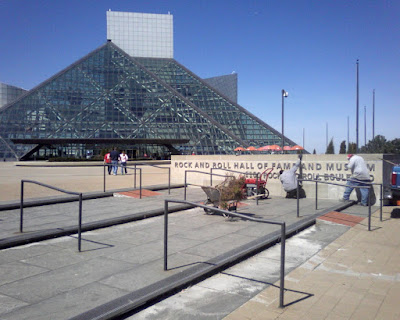
This was pretty cool for me, as a charter member (and frequent visitor) of the Rock Hall, a native Clevelander, and someone whose office overlooks the Rock Hall. I'm not sure if they made a big deal of the announcement - I was out of town, but they have very quietly put up street signs underneath the East Ninth signs that say Rock and Roll Boulevard. Last week they also changed the signage on the building itself (see photo). Woo hoo!

Wednesday, April 02, 2008

What Constitutes Technical Competance for an End User?

Unfortunately, IT people berate non-technical people all the time. Much of the time we don't understand why so many of them "don't get it" and why they are SO far behind. Although these attitudes are to be expected, they do not breed a good customer service environment. So try to put on your rose colored glasses and think that the glass is half full. There is (probably) a reason why this person is in the position they are - someone thought they were valuable (and people are WAY more valuable than machines - maybe not systems, but most machines - but that is a topic for another day).

With that respectful disclaimer in place, I have some ideas about good users vs. bad users. It's interesting, you have bitching and moaning from both of these. Good users bitch and moan constructively, and bad users, well, for many reasons. The constructive bitching and moaning is one way to tell the good from the bad.

What is the bad user bitching and moaning about? Sometimes it is everything. Nothing works. Everything sucks. Nothing is designed right. Everything is too slow. I have tried many times to turn such users away from the dark side and maybe I have even fixed a few of them - permanently - transforming them to competent users. Although this is a worthy goal, don't drive yourself crazy trying to save everyone from their (most likely self-inflicted) technological hell.

Just listen. Is there something they are doing wrong that you can correct? Is there something you can build to better accommodate their work?

Another way to differentiate the competent from the incompetent is by how well they can accomplish what they do with technology. Does it enable them, or get in their way? Most of the time we are not well qualified to make such judgments, but we are entitled to our opinions. Some people take what is given them and soar. Others get mired in problems they cannot overcome. I think we know which ones we'd rather have for customers, sponsors, etc.

Monday, March 24, 2008

Spell Check Fix Clarification

The MOSS 2007/WSS 3.0 spell check bug (that supposedly IS fixed in SP1, but I'd like to know how they fixed it) has had work arounds documented several times, but I'm not sure any of these were complete. Neither will this one be, but I have two observations I would like to share.
  • You do not need to have any special permissions on the root of your site collection (just read).
  • Spell check can also be broken with inadequate permissions in the %windir%\temp on the web front ends.
The standard "fix" is to have a document library called "Spelling" off the root of each site collection, and in that library you need a junk document named "Custom Dictionary.txt." It doesn't matter what is in this document. The users need to have at least some (read?) access to the root, but to this Spelling document library they need these permissions (and nothing more):
  1. View Items
  2. Browse Directories
  3. View Pages
  4. Use Remote Interfaces
  5. Open
With this access, depending on what they have in the root, they may not be able to see the list, and they defeinitely cannot even open it in Sharepoint. They are unaware it exists.

The other problem we have seen is that on the %windir%\temp folder (usually C:\Windows\Temp) on each of the web front ends, the Network Service needs the following permissions:
  1. Traverse Folder/Execute File
  2. List Folder/Read Data
  3. Read Attributes
  4. Delete
  5. Read Permissions
Being cruddy work arounds, I'm not sure how well these are documented anywhere. These are the steps we have had to take to keep working. It is a shame that the SharePoint community has had to endure bugs like this. Unfortunately I am pretty sure most of us will not be taking SP1, so we won't see how they fixed this problem.

Thursday, March 20, 2008

Backup/Restore "Duplicates" and Broken "Content and Structure" (Settings.aspx)

This took a couple hours of staring at things and looking at every side of everything. I had used STSADM to back up a site and restore it to another site collection. This went pretty well, except for two problems:
  1. Two of the lists showed up twice in the "All Site Content" (viewlsts.aspx) and
  2. Content and Structure (settings.aspx) would error
#1 Symptoms
I tried deleting one of the lists. Oops. It deleted both (there really only was one). Hooray for the Recycle Bin!
The allitems.aspx for each list showed two web parts for the list (this is significant).

#2 Symptoms
You could navigate to any of the lists and stuff if you opened Content and Structure from another subsite, but you could not get to the root of this site.

Fix:
Delete the extra (duplicate) webparts from the allitems.aspx and all three problems went away.

Why? Ha! You tell me! But I am happier, and the users are happier. I'm just not very warm and fuzzy (welcome to my life with SharePoint).

Monday, March 10, 2008

How to Move the Central Admin Site, Even if You Already Screwed it Up

Revised! And also see http://bobklass.blogspot.com/2008/07/moving-central-admin-again.html
Moving the Central Admin site the right way is easy:

Run config wiz on old, removing
Run config wiz on new adding


But what if you did something to screw that up, like:

Start Central Admin on new server (through Central Admin)
Stop Central Admin on old server (through Central Admin)
Run Configuration Wizard on new server

which would leave you with NO Central Admin server?

You will have to try a little harder if you really want to screw things up. To fix it:

Run Config Wizard on new and REMOVE central admin
Run Config Wizard on the old and remove central admin
Run Config Wizard on new and ADD central admin

Similarly, you probably could redo the old Central Admin if it were screwed up and then do it the right way once everything was back the way it should have been. The right way:

Run config wiz on old, removing
Run config wiz on new adding

That's all fine, but sometimes SharePoint just won't do things the right way. My production server didn't present the option to remove the Central Admin site (why?) until I removed it from the farm and added it back (and the first time I ran the Config Wizard it took over an hour!).

But then it looked like the "right way" wasn't working. Upon close inspection, everything seemed to be where it should be. The problem was that the alternative access mapping for Central Admin needed to be changed (it still showed the old server). So just put in an explicit address and include ../default.aspx and navigate to the maintenance page, or just use ../_admin/AlternateUrlCollections.aspx and then change it to your new Central Admin server.

Friday, February 29, 2008

Sharepoint Virtualization - Numero Drei

Hopefully I won't seem like a person who waffles. Or someone who jumps to conclusions. I have tried to be objective and I tried to make the testing meaningful. I will share here an unsanitized version of what I published to our team:

Our tests were performed with a two server MOSS 2007 farm with the same databases running on a fairly robust (physical) SQL cluster. One server was an indexer only, and the other served the SSP, web front end, etc. No special Sharepoint caching was turned on for any sites. The physical servers tested were HP servers with 2GB RAM and two (older) 3.4 ghz dual core processors in each. The virtual servers ran with 2GB RAM and variously 2 or 4 processors on an ESX system that I believe had two dual quad core machines and LOTS of RAM.

Three categories of test were performed:

  • Indexing performance
  • Web page traffic
  • Document library traffic/search queries

Results were monitored from various sources - HP OpenView, Loadrunner, WAPT, Windows native, and subjective.

1. Indexing
Indexing virtual to virtual with 2 processor machines seemingly outperformed physical in all categories except CPU usage, which was significantly higher on the virtuals (though acceptable). The time to complete the index was almost the same for physical and virtual farms.

We did not have any HPOV data on the indexer.

2. Web Page Traffic
An older script was run with Loadrunner, simulating 250 users for 15 minutes. The script was web page views only. In general, the virtuals outperformed the physicals in these tests. Neither was overloaded.

3. Document Library - File and Search
A short script was created to download two large files (30 MB) repetitively and do some search queries. This is a realistic document library scenario of Intranet content being downloaded simultaneously by multiple users. The script was run with WAPT via several different PC's, with anywhere from 20 to 200 sessions simulated. The tests were run from the same part of the building and presumably through a small number of ports on the same network switch.

None of the systems performed this test well. Heavy file activity can be the bane of SharePoint's existence, even though we often use it as a document management system that is easy to use and access from any office. Large files are common, and access to such files usually cannot be managed (if it were managed, we could easily cache such files and more easily serve up large files to many users).

The physical servers were slow but remained responsive during this test. CPU utilization was usually below 50%, with some higher spikes. Four processor virtualized servers remained responsive during this test, but were very slow (slower than the physicals) and CPU utilization was between 30 and 75%, with some higher spikes. Two processor virtualized was almost non-responsive. CPU utilization rose to 100% and stayed there as long as the test was permitted to run. This happened for as few as twenty connections.

Conclusions
I don't want to draw too many conclusions until we have had further discussion of the testing. There may have been other limitations to tests 1 and 3 from the SQL server. Microsoft spends more time discussing SQL than it does SharePoint servers in the latest tuning info http://go.microsoft.com/fwlink/?LinkID=105621&clcid=0x409. I previously distributed this Microsoft tuning document (published in late December).

Microsoft recommends using 4 or 5 web front ends (without much qualification). Serving up files over 15 MB or having content databases over 50 GB is taxing on SharePoint and may degrade performance significantly. This latest tuning information from Microsoft is very conservative.

Our tests indicate that multiple processors are a key to maintaining reasonable performance from web front ends. Indexing seems to work fine from a virtual server.


So am I objective or what? My tests did little to confirm any of my original line of thinking.

Saturday, February 23, 2008

Virtualizing SharePoint Part Deux

Be sure to also read the next part - Numero Drei

We are still not finished with our virtualization tests, but I had to document this early stage of enlightenment (especially since the part one post seems to have been pretty far off the mark). Since virtualization very likely will be a part of my SharePoint experience from now on, I imagine there will be a part 3, 4, etc.

The state of the art of virtualization is a lot better than I thought. One of our IT groups has been building out the infrastructure for VM such that the virtuals will have a much better future than physical machines. Using multiple dual quad core servers with scads of memory, VMWare ESX is pretty amazing stuff.

The purpose of this study is to determine our server needs for a build-out of SharePoint to include new farms in Europe and Asia with up to a terabyte of data in each, and increasing North American capacity to up to two terabytes. There are around 5000 users in 30+ locations (heavily weighted to North America). The current farm is smaller (4 machines in our North America data center and less than 200GB of content). It is currently running on brand new IBM boxes (our SQL cluster is a little bit older). New 64 bit multiple quad core SQL machines will be used (VERY physical - brutes) and all the disk is on SANs.

The way it looks from the early virtualization testing, my SharePoint future is all virtual. 100% virtual. Indexer, WFEs, apps (SQL will have those big, new 64 bit physical machines). For SharePoint servers, tested performance of a VM is comparable (often better) than physical, with so many other advantages that I probably won't want ANY physical servers for the buildout, and I will probably give up the physicals that we already have.

When I started this process I was concerned that the risks of going virtual were high. I am almost convinced that it is the best way to go for high availability and performance. It does not seem to save a lot of money, but it saves some. There may be some hard to quantify costs savings (administration, power, cooling, etc.) and fortunately I will not be under much pressure to put numbers on such things (I'd make them up!).

The final conclusions will come in future posts, but this is encouraging.

Tuesday, February 19, 2008

Holiday Valley February 16, 2008

After my first skiing trip to the Rockies last December I had hoped to get to someplace closer to home a bit sooner so I could evaluate my old skis vs. the hot new stuff I rented at Vail. I also wanted to judge the lameness of the comparative experience.

Too much time has passed, though, so I couldn't judge the skis. My long, old things seemed OK. The experience is what it is. A hill a third the length of somplace like Vail (but it feels like a fifth) and terain that probably isn't a fifth in size (you can't compare them, really). The snow was perfect at Vail vs. your typical Eastern ice in New York (ice is damn fast, though, and a challenge). The lines were a bit long this weekend too, but bearable. They were sledom long at Vail.


My conclusion is that I can still have fun on day trips to Holiday Valley, and do them like I always have, with healthy trips to the Hearth (my usual restaurant) and the bar, which is so unlike my Vail experience, where I only hit the bar afterwards.


I have a story of an altercation with one of the bartenders at the Yodeler Lodge bar. I ordered an Ellicottville Brewing Co. IPA (or pale ale) for Bryce and an Ellicottville Brewing Co. Amber for myself. She brought me back what looked and tasted like Miller Genuine Draft. I told her it was the wrong beer and she said it wasn't. I said the kegs were switched when she insisted it was right. She even poured another to show me. I told her it was OBVIOUSLY the wrong beer - the color was all wrong (that EBC Amber is very pretty in the glass, it doesn't look anything like Miller). She dramatically threw the one beer in the sink, asked me what I wanted then and took the other away. She practically threw my change at me. I should have thrown the tip at her.

Tuesday, February 12, 2008

Virtualizing - Part 1

Be sure to read the other parts of this series (because it changes a lot!):
http://bobklass.blogspot.com/2008/02/virtualizing-sharepoint-part-deux.html
http://bobklass.blogspot.com/2008/02/sharepoint-virtualization-numero-drei.html


Hopefully it won't be a misnomer to call this part 1, but at this point I really don't have a lot of hard info, just my thoughts. Later, when we've tried it, I'll add more (we all hope, right?).

If you think about how the Sharepoint components work, it is easy to rule out SQL and indexers for virtualization (at least for a large farm, as we are deploying). That leaves web front ends, query servers and application servers (Excel, Infopath). We have run our farm with query server and web front end combined. The applications will be new to us very soon.

So for us, the low risk trial will be to use the (very beefy) virtuals for applications. This especially makes sense since these are processor intensive. With WFE's, there is too much risk of underperformance. What if the cache reads are too slow? We can't have it not work well.

So I am advocating that we proceed this way.

I've been lax with my posts as I try to rest my right arm - too many mouse clicks. Very painful. I'll be back!

Check out part deux.

Thursday, January 17, 2008

Spurious SMTP Errors in Logs

On a MOSS farm where you have SMTP running on one server, the rest of the servers want to run SMTP too, but they will complain over and over in the logs that they cannnot find the appropriate directory structure.

I suppose you could install and not configure SMTP on these servers, but it is eaier to just create a dummy of the structure they want.

Under the C:\INETPUB folder create a ..\MAILROOT folder and under that create a ..\DROP folder.

This will stop a whole bunch of bogus messages.

Wednesday, January 16, 2008

How to Change a MOSS Server to a Different Farm and Configuration Database

OK, big disclaimer on this one. I didn't RTFM. But this is what I did to reconfigure our large farms (6 web/query servers plus two indexers).

If you just went to a server and ran the Configuration Wizard, you would find that you cannot switch configuration databases. If you went into Central Admin (even if it is running on another server) there is a Remove Server link. If you click it, it tells you not to do it that way. Listen to what the box is saying - do not do that. Do what I say below!

The first thing to do is run Add/Remove Programs, select Microsoft Office Sharepoint Server 2007, Change, Repair. At the end of the repair it needs a reboot.

Then you rerun the Configuration Wizard and it may know you were trying to "repair." If not (I have seen inconsistency on this), go back to Central admin and remove the server (this time answer yes). If it was still connected to a config database, exit and restart the wizard after removing the server from the farm at the ../_admin/FarmServers.aspx page. Back in the Configuration Wizard, it will now bark that it can't tell if the server is in a farm (although it seems to know that it once was). This is actually a good sign. OK that BIG message box, and then you have no choice except to disconnect from the farm. This seems to clear out any remaining settings regarding the farm. Good stuff.

Then (I think you can guess this), you rerun the Configuration Wizard. Now it is like the first time you ran it on a freshly installed server. You can connect to another config database and it will run the full range of tasks (this whole process is one of the cooler administrative things I have ever seen - I wish the rest of the software was as cool!). It syncs up all your installed features and stuff. You are done, and ready to give this server a role in your farm.

Tuesday, January 15, 2008

SharePoint Book Reviews

People often ask me if there is a particular SharePoint book that I recommend. Sometimes they want basics, sometimes developer stuff. I have had a hard time finding SharePoint related books that I liked. I know I should have spent more time in the book store at Tech Ed last year, but it was a very busy conference (networking 7/24, don't ya know). Visiting the computer section of the local Barnes and Noble's, Borders, etc. can also be a very unfulfilling experience if SharePoint is what you are after. The local library (even in this lovely major metropolis) is only somewhat more fulfilling. Visiting Amazon, there seem to be a number of potentially good ones out there. I will give the scoop as I see it on the few that I know pretty well.

Since we consumers in the U.S. see these books on the shelf and recognize their publishers' branding, I will identify these by publisher. No slight to the authors intended! There is more method to this madness - I think that Wrox is on to something, and they actually have a useful, coherent layout of books.


Wrox - SharePoint 2007 and Office Development

This book turned out to be very good. They have a "tree" of related books, and this is at the top (the bottom being the "beginning" books). It explains a lot of stuff in fairly good detail. Best I've seen. It doesn't have a ton of code in it, but it has some, and it explains how things fit together.


Wrox - Beginning Sharepoint Administration

Beginning Sharepoint Administration was the best "basics" book I have seen. It had twice the detail in half the space of the "Administrator's Companion" book I have.


Apress - Workflow in the Microsoft Office 2007 System - It seems to go a long way towards explaining how things work, and it has some decent examples. Unfortunately it can't make the product function better than it is!

Microsoft - Office Sharepoint Server 2007 Administrators Companion - I can't say much nice about it. Maybe I dislike it because it was free. It never seems to have the answer to any questions.

Be sure to avoid older SharePoint books! There is little about WSS 2.0 or SPS2003 or anything earlier that would still be relevant.

Thursday, January 10, 2008

Publishing Site - Create Page - Permissions on Master Page and Page Layout Gallery

When I had this little problem yesterday, I fairly quickly (almost instinctively - that's getting scary) knew what it was. The title of this post may be all the hint anyone would need to fixing such a problem.

I set up a power user as a full control of a publishing site. Yet he could not create a page. To make a (medium) story short, the permissions on the master page / page layouts gallery were very restricted. I don't know how they got that way - either one of us admins/owners/developers screwed it up or the upgrade process did (this was once an SPS 2003 site, up since January 2006, converted to MOSS last June). Once everyone was allowed to read the gallery, the problem was fixed.

I am fairly certain this is only for a publishing site (or at least for a publishing site but not a team site). I think with team sites the (fewer) page layouts that are available are contained within the content types for that template (or something like that). I hope this helps!

Tuesday, January 08, 2008

WSS 3.0/MOSS 2007 SP1 First Impressions

Impression 1 - the Databases

I don't know what I was thinking. I guess I didn't think about it enough. What should one expect in SharePoint (WSS and MOSS) SP1? I could think of a few insidious bugs and things - simple stuff like site templates that don't hold chrome state. But I hadn't thought about how it would be delivered and implemented.

If you think about it a little, you come to the realization that a small portion of fixes might be in software that goes on the file system, but the majority of the stuff will be in the databases. That should make you go - o, oh. Danger Will Robinson. So that's what you should expect, an upgrade, similar to what you went through from WSS 2.0 / SPS 2003 to 2007, but maybe ratcheted down by several degrees of difficulty. But still a very serious undertaking.

Impression 2 - the Documentation

I AM impressed. This right here is a great read if you are at all enthusiastic about SharePoint: http://go.microsoft.com/fwlink/?LinkID=105621&clcid=0x409. This is highly recommended reading. One more time - READ IT. It has what they are calling "updated guidance." There are some new ways to categorize your installation (how to determine if you are small, medium or large). Then there are some hard core recommendations (almost warnings) about how to set up your system and thing to avoid. Much of this is important to know and doesn't necessarily have anything to do with SP1. You will find numerous other links from this document and elsewhere, but start here - trust me, it's interesting.

In some ways, it is an admission of not readiness for prime time. Let's not forget the obvious - SharePoint is sitting on top of SQL Server. As long as this is the case, it is a poor substitute for a file system (and it cannot be an industrial strength document management system). Until the future versions are built on Bitlocker, it has serious limitations. That version should be out in a couple years (my SWAG).

Impression 3 - Fixes and New Features

Here is where I really have not finished my homework. Uh, I think the fixed a lot of stuff - I read about some. And uh, I saw one cool feature (necessitated by the documentation they released that said to keep content databases under 100GB) a new switch in stsadm to move a site collection to another database. I'm sure there are more cool features, but I haven't gotten to them or the bugs in any detail.

So I'm stuck on the process for now, and I probably won't have time to dig in further for a month. Don't expect a trivial or simple upgrade to SP1. I didn't expect that, but I still was somewhat surprised by the scope.

Thursday, January 03, 2008

SharePoint Branding (if you must)

I am resistant to SharePoint branding. Back in 2006 we branded an SPS 2003 portal, partly for fun, partly to learn and partly because we hoped it would be a positive thing. Besides being pretty ugly, it had so many issues we never attempted to fix them. When we upgraded that portal to MOSS 2007, we left the branding behind. Other than that bad experience, the other reason I am resistant is because screwing with the branding has a huge potential downside - there is a lot you can break, and little you can enhance.

You could completely change the appearance of Microsoft Word (not just functionality, appearance). But why would you? How is this different? Expectations, that's how.

We have had to brand a couple 2007 systems at the firm. For the first one, we hired an extremely well known SharePoint Branding person. She was great to work with and fixed all the issues we fed back at her. It is important to note, that even if you are pretty expert at the process, it is replete with pitfalls. We went through numerous iterations to get things right with that first branded 2007 site. For our branded second site, we decided to try our hand at it.

Modify a Default or Start Minimalist?

I think it depends. Maybe if you were staying fairly close to out of the box, modifying what was already there might be OK, but it won't take you long to realize that you have poked a hornets nest with a stick.

We had some interesting design directives. I don't think they add anything from a usability or content standpoint, but they made for an interesting project. We were to make it look like a newspaper or a newspaper web site. Mostly black and white. A few balanced columns. Masthead look. Times family fonts. Since none of this is anything like out of the box, we started with a Heather Solomon style minimalist page (http://www.heathersolomon.com/blog/articles/BaseMasterPages.aspx).

Near the bottom of this page (but not all the way down), we stuck a layout table that looked like what we needed. Then we started moving some things in there, and other things into a hidden section. We liberally cut and pasted code around the master page and from the default master page.

So Many Styles

Creating styles and sticking them in a custom CSS is simple, but there are a LOT of styles that need attention. We had to change colors on all the little border pieces and stuff. This can take a while to find. We used the IE Developer toolbar and similar tools in FireFox to find and test these components.

I would estimate that so far we have around 40 hours in this process - maybe 16 for me and 24 for my co-worker - and so far we have a good demo. But we have a long way to go. We figure we will need to fix up a theme to take care of pages originating from ../_layouts/. We also have a number of loose ends and I am sure that we will get a bunch of further requests (fonts, graphics, and we have not yet done the home page layout). Based on that, I have to estimate that we have at least another 80 hours of work before we can go to a QA phase.

I know that some of the content we will end up presenting in this site will get a lot of use, but I am of the opinion that the branding will neither make nor break this project. Content is much more critical. I would rather work in an out of the box environment than a branded one. What we are creating doesn't look like Sharepoint. So what?